Schedules
Review recurring operational work such as context audits and profile learning.
Schedules create durable work when their next due time arrives. They do not keep a worker sleeping between runs and do not rely on a Redis message as the only scheduling record.
Hourly integration metric refresh appears as a read-only system entry in this list. Its timing comes from the same backend-owned connector state used by Insights; it is not an agent task and does not create a second scheduling record. Open the entry to review each integration’s cadence, last and next refresh, tracked metrics, and attention items.
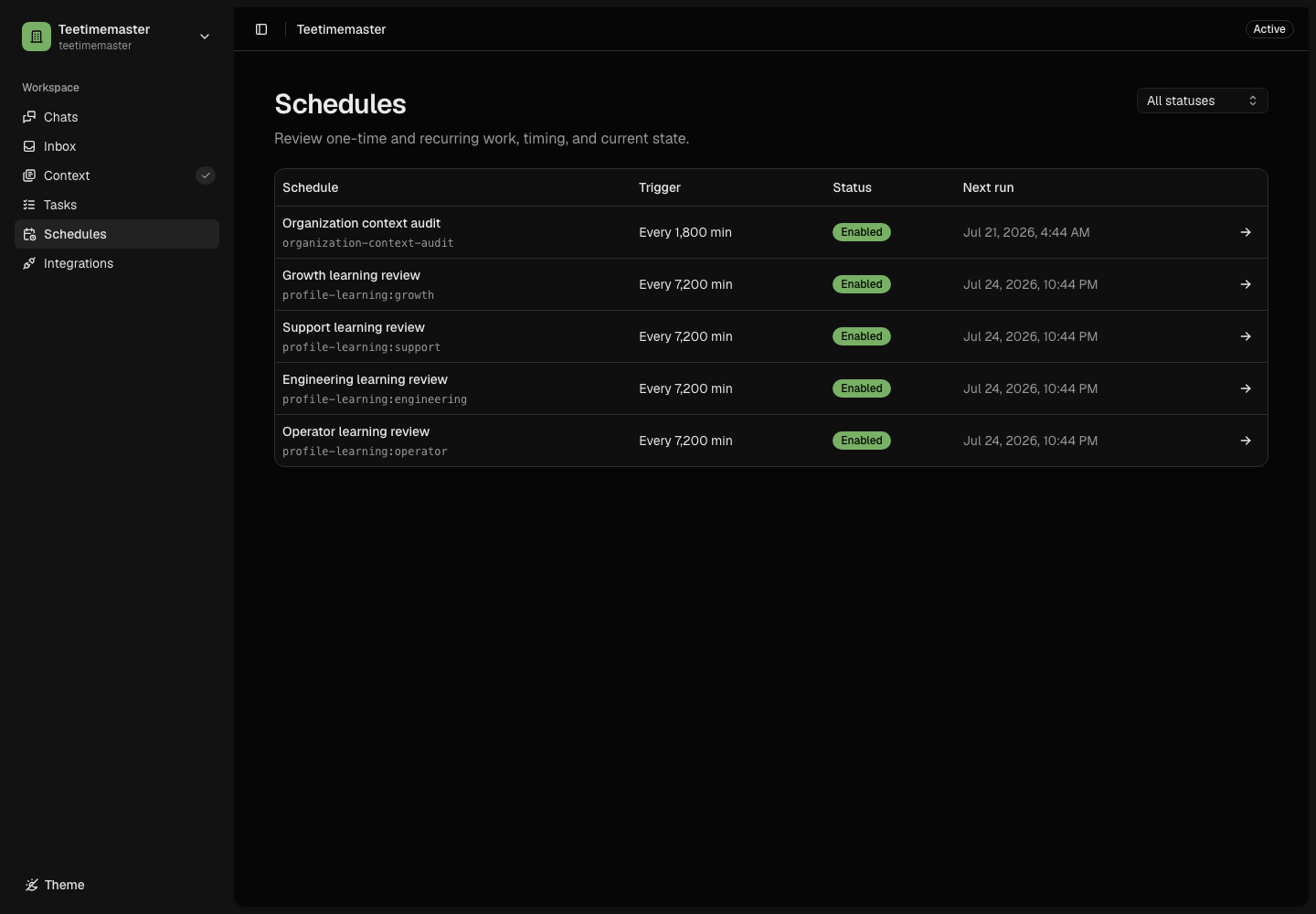
The schedule list makes each durable trigger, status, and next run inspectable before opening its execution history.
Built-in Scheduled Work
An activated organization can include schedules for:
- organization-context audits; and
- bounded profile learning.
Additional recurring workflows can be created when they have a clear owner, interval, outcome, and safe execution contract. An agent can also create a one-time or interval schedule for its own future work when that schedule is explicitly required by the active task or chat request. It cannot use a schedule to defer required current work, bypass a run budget, or keep a worker alive between runs.
Review a Schedule
Check:
- whether the schedule is built in or agent-created;
- owning profile;
- enabled or disabled status;
- next run time;
- timezone interpretation;
- run mode;
- expected task output;
- integration access; and
- whether consequential effects require approval.
Pause and Resume
Pause a schedule when its evidence, integration, owner, or business need is no longer current. Resuming should preserve the durable schedule identity and compute the next eligible run rather than creating a duplicate schedule.
Built-in organization schedules are marked System and are read-only. Agent-created schedules retain the profile and task-run or chat-turn provenance that created them.
Before creating another schedule, agents inspect stable keys and reuse or update an equivalent agent-created schedule. Department task agents can manage only their own department schedules; Operator can coordinate enabled departments, and Chat is bounded to the active user turn.
The schedule list labels this source directly and can be filtered by department, source, and status. Its department column resolves the owning profile’s name instead of showing an internal profile ID. Opening a schedule keeps the same human-readable owner and source while retaining the durable schedule identity for support and audit work.
Failed Scheduled Work
Inspect the generated task and its attempts. Correct the underlying configuration, context, or integration problem before retrying. Repeated creation of new schedules hides failure history and is not a recovery strategy. Firing failures use exponential backoff. An agent-created schedule is disabled and marked as requiring attention after five consecutive failures. Oblive-owned system schedules remain enabled, keep retrying with bounded backoff, and are reconciled on backend startup so a stale built-in definition cannot permanently stop recovery.
Manage schedules in Chat
Ask Chat to create a schedule, show what is planned, change its instructions or timing, pause it, resume it, or remove it. For example: “Send the weekly sales review to Growth every seven days, starting Monday at 9 am in our company timezone.” Chat confirms the saved next run and whether the schedule is active. It asks only when the target schedule or a necessary detail is unclear.
Editing preserves the schedule’s history and paused state. If someone changes it at the same time, Chat must read the latest version before applying another edit. Removing or pausing a schedule does not cancel tasks it already created. Built-in schedules remain read-only.
Schedules support a specific future time or an interval in minutes. Calendar rules such as weekdays only, month boundaries or a fixed local time across daylight-saving changes are not supported. Chat explains that limit instead of silently choosing a different schedule.