Integrations
Connect organization-owned tools without exposing provider credentials to agent processes.
Integrations give selected profiles bounded access to external systems. Organization owners control which provider is connected, which tools or services are enabled, which profiles receive access, the exact write permission mode, and the business meaning stored in Context.
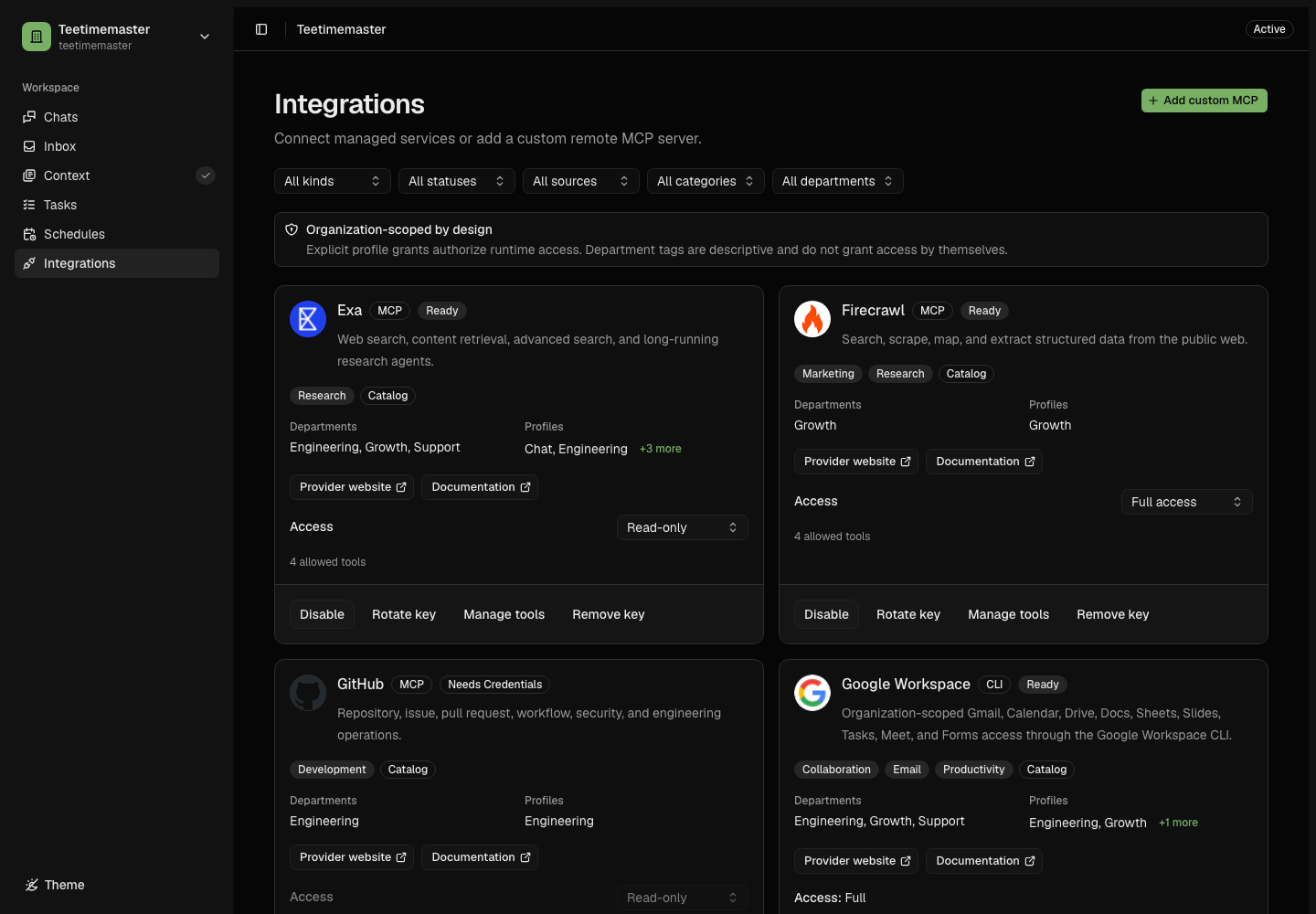
Cards summarize provider identity and readiness. Connection, access policy, tools, and business context live in one management sheet.
Registry and Management Sheet
The registry stays intentionally compact: each card shows the provider logo, name, short description, one readiness badge, and one contextual action. Select Connect, Choose scope, Choose tools, Manage, or Review to open that provider without losing the current filters or page.
The management sheet has four consistent sections when a connected provider exposes tools:
- Connection contains provider guidance, official links, redacted account state, credentials, consent, and managed resource scope.
- Access contains actual profile grants, descriptive department scope, and the exact Read-only, Ask before writes, or Autonomous permission mode.
- Tools appears after an MCP integration is connected and owns the explicit eligible-tool snapshot. Tool search matches tool names only and never changes authorization by itself. Search and selection controls remain visible while the inventory scrolls. Select all eligible tools always targets the complete inventory rather than search results.
- Usage optionally records company purpose, department meaning, typical work, policy, and working resources. Changes save directly with a revision check; there is no onboarding review. Leave the purpose blank to use the provider’s catalog description. Catalog improvements do not overwrite your customization.
Use the lifecycle actions at the top of Connection to enable, disable, reconnect, rotate, disconnect, or remove credentials. Stored secrets remain hidden. Unsaved forms must be discarded explicitly before closing the sheet, switching sections, or navigating away.
Integration Types
| Type | Who Defines It | Examples |
|---|---|---|
| Managed provider | Reviewed catalog plus hosted or fixed backend provider | Resend, GitHub, Lemon Squeezy, Upstash |
| Managed CLI | Reviewed catalog, pinned vendor binary, scoped gateway | Google Workspace |
| Native Git | Reviewed GitHub runtime and backend smart-HTTP gateway | Engineering repository source transport |
| Custom remote MCP | Organization configuration with strict HTTPS validation | An organization-owned Streamable HTTP server |
| Trusted local MCP | Agent image and Git profile grants | Structured questions |
Connect and start working
Provide an API key or complete provider consent, then choose a resource scope only when the connector requires it. GA4 automatically selects a sole property; Lemon Squeezy automatically selects a sole store. Multiple properties or stores require your choice. MongoDB collection and field scope and Upstash key scope remain explicit.
New connections default to Ask before writes. GA4, Upstash, and MongoDB remain Read-only. Saved permission choices survive reconnects and credential rotation. The connection selects the currently eligible tools; you can narrow them later in Tools. There is no required review or usage-mapping step after a usable connection succeeds.
Save feedback and verified access
Every saved change shows a toast. Settings saved confirms persistence. Connecting runs a bounded read check. Connected — Oblive can access the selected data means an approved read succeeded for the current configuration. Individual service permissions and historical metric coverage remain separate. The sheet and registry retain health after the toast closes.
Use Check connection to check again and request recovery of paused reporting collectors. Expired authorization requires reconnection; resource permissions and reporting setup have separate messages. If a save times out, reload current settings before repeating it. Pending changes prevent leaving. Rechecking a paused collector queues a new read; it does not make previously denied history readable until collection succeeds. Repeated checks respect the collection cooldown and any active lease.
Crisp’s Metrics section accepts a separate REST token for the connected website, verifies website and conversation access, and stores it encrypted. Removing reporting access preserves the agent connection. Database metrics settings choose permitted keys or indexed creation-date fields.
Google Disconnect removes only this saved connection. Revoke Google authorization revokes the shared grant; its confirmation explains the impact on other connections using that account and OAuth app, including other organizations.
Credentials
Credential inputs are write-only. The product reports readiness and redacted account information, but it never returns the stored secret. Provider credentials are decrypted only inside the backend gateway for an authorized execution.
Current State and Business Context
The integration registry stores both current connection permissions and saved operating context in PostgreSQL. Operating context describes purpose, department usage, business rules, workflow roles and resource bindings. Credentials remain separate and are never included in agent context.
You can open Usage at any time to customize how the organization uses the integration. Changes become available immediately through contextctl integration show <key>;
there is no agentic refresh or document upload. Concurrent edits are rejected with a reload message.
Connection and permission changes invalidate stale authorization and chat sessions independently. Saving purpose or usage clears resumable chat context without changing tool permissions. Lessons learned while working can still be stored asynchronously in memory files.
Readiness
Readiness is a control-plane assessment; it does not call the provider.
| State | Meaning |
|---|---|
| Ready | Enabled, credentialed when required, and has at least one allowed tool. |
| Disabled | Connection material and tools exist, but runtime use is disabled. |
| Needs credentials | The required provider credential is missing. |
| Needs configuration | A managed data connector still needs a resource scope. |
| Needs tools | Credentials and resource scope are valid, but no reviewed tool is selected. |
| Unavailable | The reviewed catalog/runtime no longer permits this connector. |
Every new run receives the latest eligible inventory. An already-running task is not hot-patched; if authorization changes, its old capability fails and the work restarts from current state.
Access choices
Ask before writes uses the durable action approval flow for each consequential change. Choose Read-only to disable writes or Autonomous to permit reviewed task actions under existing grants, scopes, budgets, and policies. Explicit Chat requests approve only the requested change, within current access limits. Provider tools added later stay unavailable until selected; reconnecting preserves the current tool snapshot.
Continue
- Managed Providers
- GitHub and Native Git
- Hostinger Email
- Meta Ads
- X
- X Ads
- Google Workspace
- Upstash, MongoDB, and Google Analytics
- Custom Remote MCP
- Access and Consequential Actions
Optional working resources
In Usage, add repository, workspace, project, campaign or account identifiers when they help agents choose a default. Repository and advertising-account selections are working defaults; they do not add authorization restrictions. Provider permissions and enforced connection scopes remain authoritative. Missing company-specific details are requested when a task needs them.
A saved connection is separate from reporting permission, research progress, metric coverage, and current provider health. A reporting problem does not make unrelated capabilities unavailable.
Calculation settings
In Insights, choose a metric and open Calculation settings where supported. Preview the result, then save a new version. MRR controls include past-due subscriptions and recurring discounts; ARR inherits MRR. Revenue controls select tax treatment and refund occurrence or original-payment dates. These billing choices apply consistently across the company’s supported billing sources.
Reporting timezone is adjustable for retained timestamped events. Daily provider reports keep their original timezone. Missing tax details or refund timing produce gaps. A preview cannot manufacture history that the provider has never supplied.
Previous definition versions remain available in the version selector. Available history recalculates in bounded background work while the workspace remains usable. Saving requires a fresh preview if another owner changed the definitions in the meantime.